
Latest Version
Released:Oct 9, 2026
Description:
Single Installer Windows 64-bit Scribe3D Version 4.0.8
SHA1 checksum value:
2d7fbd5abeaa99d9905698e9ed48f37b876fe5a9
Scribe3D
Built on modern game engine technology, Scribe3D is a physical protection system development and analysis tool that allows users to play out attack and defense scenarios using a variety of high-fidelity facilities, props, personnel, weapons, and vehicles. Developed by Sandia National Laboratories, Scribe3D can be used to create tabletop exercises simulating theft, sabotage, or natural disasters that help visualize attack and response action in real time and convey realistic and actionable consequences.
What Scribe3D Can Help You Do
Evaluate security system effectiveness- Develop engaging tabletop exercises that provide science-based, actionable results.
- Create realistic scenarios by adding more than 100 3D props, equipment, and personnel.
- Compute Probability of Neutralization (PN) using Probability of Hit/ Probability of Kill (PH/PK) data.
- Easily add, move, or replace security personnel or technologies for increased effectiveness.
- Suggest or justify facility upgrades before purchasing any components.
- Develop scenarios to test response force and emergency management tactics and procedures.
- Create videos and record results from tabletop scenarios to develop consistent staff and responder training.
- Conduct virtual facility tours for regulatory, emergency, and off-site responders.
Creating 3D Facility Models
The more accurate the model, the more useful the data received from tabletop exercises and technology testing. Sandia National Laboratories offers approved partners expert modeling assistance to build facility models on a case-by-case basis.
Scribe3D Hypothetical Model Library
Use a hypothetical facility from our library of pre-created facilities and terrains to develop training and test technologies.
Pool Type Reactors
Lagassi Institute of Medicine & Physics- Category: CAT I.
- Pool type reactor, light water moderated, using highly enriched uranium (HEU) fuel.
- Includes a nuclear fuel waste storage facility.
- Located in a remote setting.
- Category: CAT II.
- Multi-purpose, open-pool type, light-water-moderated reactor using 19.75% U-235 enriched fuel.
- Research institute connected to university, located in an urban setting.
Pressurized Light Water Reactor
Lone Pine Nuclear Power Plant- Category: High Radiological Consequence (HRC).
- Two-loop pressurized light water reactor (PWR).
- System consists of a reactor, a closed primary coolant loop connected to the reactor vessel, and a closed separate power conversion system (secondary coolant) for the generation of steam to power the turbine(s).
Advanced & Small Modular Reactors
Small Modular Reactor Facility- Category: High Radiological Consequence (HRC).
- Four integrated Pressurized Water Reactors (iPWR) using 5% U-235 enriched fuel.
- Each of the four reactors uses natural circulation to cool the reactor upon shutdown.
- A rural, multi-level facility housing a micro reactor.
- Accessed via a network of small roads leading to a mountainous environment.
- A facility with a reactor, multiple external buildings for staff, and an entry control point.
Transportation Terrains
Transportation Terrain- A small urban center with multiple roads, a commercial shipping port, and a railway system.
- The roadway system includes bridges and winding paths and the rail system cuts through a gorge with an overhead bridge, which are useful for planning attack/response exercises.
- The commercial shipping port facilitates amphibious attacks.
Radiological Facilities
Blood Bank- A single-story building with a front lobby that enables free public access and a blood collection area with limited public access.
- The blood lab, irradiator room, and storage areas are secure spaces with access controls.
- A multi-story building that includes labs, operating rooms, waiting areas, and offices.
- Houses a teletherapy gamma knife.
- Located in a warehouse in an industrial area on the outskirts of a town and near a municipal airport.
- The interior includes a conveyor belt, a control room, and a storage area.
- A gated underground material processing facility that includes two buildings.
- Set in a remote, rural area.
Scribe3D Video Production
Use Scribe3D video capabilities to record exercises for review and discussion, or to create customized training videos.
Downloadable Content
CAT I pool-type reactor, light water moderated, using highly enriched uranium fuel. Includes a nuclear fuel waste storage facility. Located in a remote setting. Hypothetical.
Category High Radiological Consequence (HRC) two-loop pressurized light water reactor (PWR). System consists of a reactor, a closed primary coolant loop connected to the reactor vessel, and a closed separate power conversion system (secondary coolant) for the generation of steam to power the turbines. Contains specific architecture and physical security alterations based on ITC updates. Hypothetical.
CAT II multi-purpose, open-pool type, light-water-moderated reactor using 19.75% U-235 enriched fuel. Research institute connected to a university, located in an urban setting. Hypothetical.
Simple terrain useful for demos and training. Contains an obstacle course, lake with trees, mountainous road, shooting range, and warehouse. Hypothetical.
Hypothetical large terrain with a forested highway, a cargo port, large body of water, two-lane bridge over a railroad, and small city area.
Structure; Guard Tower; Single Wood Door; Single Metal Door; Single Cypher Door; Double Wood Door; Double Metal Door; Double Cypher Door; Glass Door; Glass Door 2; Glass Door 3; Rollup Door; Sliding Door; Sliding Door 2; Bunker Door; BBRE Tower 30 ft; BBRE Tower 40 ft; BBRE Tower 50 ft
Scale; Chemicals; Test Tube; Test Tubes; Small Test Tubes; Dispenser; Flask; Flask 2; Flask 3; Flask 4; Flask 5; Chemistry Box
Bucket; Bucket 2; Janitor Trolley; Trolley; Caution Sign; Broom
Camera; Infrared; Microwave; Fence Builder; Wall; Oak Tree; Barrel; Ceiling Light; Structure; Single Metal Door; Double Metal Door; Chair; Desk; Stairs
Desk; Desk 2; Chair; Chair 2; Chair 3; Table; Table 2; Radio Base; Toilet; Urinal; Keyboard; Monitor; Display; Mouse; PC; Laptop; Printer; Paper; Server; Phone; Plant; Plant 2; Scale; Floor Scale; Hand Radio; Cell Phone; UPS
Gas Pump; Gas Pump 2; Gas Pump 3; Island; Island 2; Sign; Sign 2; Sign 3; Sign 4; Air Pump; Air Pump 2; Cleaning Pod; Oil; Oil 2; Oil 3; Soda Can; Paper Bag; Brown Bag
IED 1; IED 2; IED 3; IED 4
Scaffold; Pipe Tiny; Pipe Small; Pipe Medium; Pipe Long; Pipe End; Pipe Turn; Valve; Valve T; T Pipe; Pressure Gauge; Straight Short Pipeline; Up Short Pipeline; Right Turn Short Pipeline; Left Turn Short Pipeline; Straight Tall Pipeline; Long Tall Pipeline; Up Tall Pipeline; Down Tall Pipeline; Right Turn Tall Pipeline; Left Turn Tall Pipeline: Pump 1; Pump 2; Walkway Crane; 5-Ton Crane; 15-Ton Crane; I-Beam; Transformer Large; Transformer Medium; Transformer Medium 2; Transformer Small; Transformer Small 2; Transformer Small 3; Transformer Small 4; Cable Tower; Cable Tower 2; Power Lines; Power Lines 2; Circuit Breaker; Turbine 1; Turbine 2
Ceiling Light; Cage Light; Street Light; Floor Light
Boulder; Oak Tree; Pine Tree; Bush; Water Plane
Anthurium; Elephant Ear; Helioconia; Cordyline; Red Ginger; Banana Tree; Tropical Tree 1; Tropical Tree 2; Tropical Tree 3; Tropical Tree 4; Tropical Tree 5; Tropical Tree 6; Tropical Tree 7; Tropical Tree 8; Tropical Tree 9; Tropical Tree 10; Tropical Tree 11
Fence; Fence Builder; Gate; Gate - Sliding; Gate - Keypad; Gate - Arm; Wall; Fogger; Strobe Light; Taut Wire; Taut Pole; Taut Pole 2; Taut Mid; Taut Mesh; Volumetric Fence; Vol. 24ft Pole; Vol. 12ft Pole; Wedge; Bollard; Fence Pole; Roadblock; Aircraft Cable; Camera; Trap Cam; Cam Tower; Infrared; Infrared 2; Infrared 3; Iris Sensor; Fence Vib. Sensor; Vib. Sensor; Metal Detector; Wand MD; BMS; Microwave; Int. Microwave; Int. Microwave 2; Exterior Dual; PTZ Camera; IR Tower; Rad Detector; Geiger; Rad Device; Rad Device 2; Rad Pager; Cypher Lock; Card Reader; Hand Sensor; Intercom; Exit Button; Open Button; FDB; Panel; Panel 2; Panel 3; Panel 4; Panel 5; Duress Button; Fighting Position; Hard Point; Ground-Based Radar; Portable Vehicle Barrier; Walkthrough Rad Detector; Plexiglass Barrier; Modular Fortified Combat Position; Stationary Short Fortified Combat Position; Modular Wide Fortified Combat Position; Shark Cage; X-Ray Machine with Rollers; X-Ray Machine; Personnel Scanner; Conveyor Part 1; Conveyor Part 2
2-Lane Road; 4-Lane Road; Tunnel; Stop Sign
Barrel; Radioactive Barrel; Plastic Barrel; Container; Crate; Box; Shelves; Shelves 2; Shelves 3; Storage Tank; Paint Can; Dumpster; Key Locker; Cabinet; Pallet; Backpack; Backpack 2; Backpack 3, Small Cage; Medium Cage; Large Cage; Waste Container; Pig; Pig Body; Pig Lid; Tool Box
Ladder; Step Ladder; Stairs; Folding Ladder; Ext. Ladder; Catwalk; Catwalk One-Side; Catwalk Two-Sided; Catwalk Corner Left; Catwalk Corner Right: Catwalk End: Catwalk Steps Two-Sided; Catwalk Steps left; Catwalk Steps Right
Truck; Forklift; Crane
Generator; Generator 2; Bell Fan; HVAC; HVAC 2; HVAC 3; HVAC 4; Vent; Vent 2; Vent 3; Vent 4; Vent 5; Wall Vent
Green Screen; Blue Screen; White Light; Blue Light; Cyan Light; Green Light; Red Light; Violet Light; Yellow Light; Orange Light; Warm Light; Dim White Light; Dim Blue Light; Dim Cyan Light; Dim Green Light; Dim Red Light; Dim Violet Light; Dim Yellow Light; Dim Orange Light; Dim Warm Light; 3-Point Light; Monitor Green; Display Green; Laptop Green
1ft Radius; 1/4 Mile Radius; 1/2 Mile Radius; 3/4 Mile Radius; 1 Mile Radius; Blue Cube 1ft; Red Cube 1ft; Yellow Cube 1ft; Green Cube 1ft
Helicopter; Police Helicopter; News Helicopter
Chase Van; Semi Truck; Flatbed; Bus; Forklift; Excavator; Mobile Crane; Train; Sedan; Black SUV
Business Man; Business Woman
Scientist Male; Scientist Female
Response; Adversary; Civilians; Police; Box Truck; Police Car; SUV; Truck; Work Truck; Police SUV; Patrol Boat; Drone
Firefighter; Hazmat Worker; Dog
Firetruck; SWAT Truck; Police Van; Security Car; Ambulance
Armored Truck; Humvee; Armored Cargo; Soft Cargo; Tank
Container Ship; Transport Ship; Coast Guard; Navy Ship
Three Adversaries breach the outer fence (which has no detection) and make their way to the back door of the reactor hall. The alarm is triggered when the adversaries breach the door.
All four adversaries start the scenario on the South side of PIDAS fence. Scenario detection kicks-off with 2 Adversaries providing cover fire on the two nearest East & West towers to cover breaching activities for the first two PIDAS fence breaches. This gunfire causes tower guards to immediately set off the emergency alarm and alert all response forces. The two adversaries shooting at the towers successfully stop the tower guards from opening their firing ports and returning fire. After both fences are breached by the 2-man breach team, the 2 adversaries providing cover fire follow the breach team into the facility and take up positions of cover near the East and West storage tanks and engage targets of opportunity.
Three Adversaries breach the outer fence (which has no detection) and make their way to the back door of the reactor hall. The alarm is triggered when the adversaries breach the door.
The Active Insider is the rear service entrance officer. Three adversaries drive up in a civilian box truck and the Entry Control (active insider) accepts their fake credentials and allows them to enter the facility undetected.
The Active Insider is the Service Entrance officer. Three adversaries drive up in a maintenance vehicle and the insider accepts their fake credentials and allows them to enter the facility through the rear service entrance undetected. Adversaries park the truck at the rear loading door and the driver uses stolen credentials to open the door and enter the facility undetected. The driver props the door open for the two remaining adversary accomplices hiding in the back of the truck. The driver returns to the truck.
The active insider is an employee with access to the Turbine Hall - The saboteur is a workman with maintenance tools and equipment. Part of his job is to conduct various maintenance tasks at the facility. He arrives at night, outside of his normal working hours and tells the ECF guards that he forgot something important at his desk. Instead of going to his office, the insider makes his way to the Southern exterior door of the Turbine Hall. The insider swipes his badge to gain access to the turbine hall undetected.
Adversary Victory: Convoy drives down road, each vehicle about 50-75ft apart. Order of convoy (from front to back): Scout, Lead, Transport, Trail. An Adversary group is waiting to ambush up ahead. An IED is set up on the side of the road, able to be remote detonated on command. As the Transport vehicle crosses the IED, it is detonated. Adversaries open fire on all other vehicles, including an RPG destroying the Scout Vehicle. The Convoy Commander radios for help but all Response are eliminated quickly due to being surrounded. Adversaries drive their Pickup Truck around to back of Transport vehicle, they load up the truck with their target material and drive away. Response Victory: Convoy drives down road, Scout vehicle is ¼ mile ahead convoy, Lead is ~500ft ahead Transport, and Trail ~500ft behind Transport. An Adversary group is waiting to ambush up ahead. An IED is set up on the side of the road, able to be remote detonated on command. As the Transport vehicle crosses the IED, it is detonated. Lead and Transport stop and take up a fighting position. Convoy Commander contacts Scout. Scout turns around and takes up fighting position (Area A). The Convoy Commander radios for help. A firefight occurs but Adversaries are unable to gain ground, Adversary Assault attempts to get an angle on Scout vehicle but is exposed and shot down. Adversaries eventually attempt a desperate last effort to steal the target material. They drive up and try to breach the Transport but are shot down.
At approximately 1630, a box truck turns at a high-traffic city intersection. The bed is stuck by a speeding sedan traveling eastbound. The rear of the box truck is subsequently hit by a black SUV heading west bound. The sedan is rear-ended by a pickup truck, wedging the sedan under the bed of the box truck. A green SUV, which had been stopped at the stoplight, witnesses the accident, and promptly dials 911.
An alarm is triggered by microwave sensors in the perimeter intrusion detection and alarm system (PIDAS). Responders in the south side towers engage and neutralize Adversary Team A. A UAS is deployed to inspect the area and perform a perimeter search. Offsite response begins to muster for deployment.
Alarm is triggered by fence vibration sensors, and an UAS is deployed to inspect the area, locating the Adversaries. Response begins to muster. Response 1 and Response 2 exit the north end of the facility and begin moving to intercept Adversaries. The UAS performs a perimeter inspection.
Convoy approaches a known point of vulnerability, crossing a bridge along the designated route to the port. The convoy halts while the scout vehicle moves closer to the bridge. Shortly before reaching the bridge, the scout vehicle stops and deploys a surveillance drone. The drone is piloted to perform a sweep of the area on the far side of the bridge. The drone operator observes a team of armed adversaries with a nearby vehicle on the far side of the bridge.
Adversary UAS operator launches drone from location of cover and concealment on the north end of the facility. The UAS operator pilots the drone to the roof of the northeast tower and detonates a PG-7V warhead, killing the responder inside the tower. Coordinated with the explosion of the drone, a team of five adversaries begins breaching the PIDAS of the facility on the north end, out of sight of the responders in the remaining towers. Four responders posted in the administration building at the edge of the owner-controlled area begin to muster for response. The team of five adversaries move to the north edge of the facility and begin breaching the exterior door.
Three Adversaries approach the facility from the south side and three adversaries approach from the east side. The UAS begins circling the facility, observing for any responders moving to interdict Adversaries. Two responders are dispatched from the north end of the facility when CAS notifies them of a fence vibration sensor alarm on the east side. As the responders exit the north end of the facility, they are observed by the adversary UAS operator who pilots the UAS towards them and detonates the explosive package.
The UAS operator pilots the drone towards an armed responder who was checking the vehicle delivery gate during his patrol. The pilot crashes the drone directly next to the responder, detonating the explosive warhead and killing the responder. As the drone is moving towards the responder, the remaining six adversaries approach the fence from the south.
Convoy drives down the road. Scout vehicle is ~1/4 mile ahead of the convoy. Adversary has emplaced a deliberate ambush surrounding a bridge along the transport route. As the convoy drives onto the bridge, Adversary 1 opens fire on the lead vehicle, disabling the vehicle and killing both occupants. An adversary operating a UAS that was launched shortly before the attack began, observes the scout vehicle through a camera on the UAS and pilots the drone into a converging trajectory. The UAS collides with the scout vehicle and detonates an explosive PG-7V warhead, destroying the vehicle.
A disgruntled employee helps implant a device on a field distribution box within the Perimeter Interior Detection and Assessment System to allow for wireless access to the Physical Security System. Adversaries are able to cause a PSS network outage as Adversaries perform a sabotage on LPNPP.
Release Notes
Version 4 Release Notes
Overview
Scribe3D version 4 includes new capabilities, bug fixes, and enhancements to workflows. Changes were focused on the improvement of performance, visualizations, and reimagining of tools employed by users to create models for scenarios.
Note: If you are upgrading to Version 4 from a previous Version of Scribe3D, please read and follow the associated Upgrade Guide to convert your existing scenarios.
Cost Calculator
Associate a cost with Entities and Props to examine the cost of adding and/or updating Physical Security measures. In the Tools menu, the Cost Calculator can be accessed. Opening the tool will open the Cost Calculator panel, identifying all Props and Entities that have an associated cost. These costs will break down by Name of element, Installation Cost, Yearly Cost, and Quantity of the security element. Each dropdown will show a detailed cost breakdown of each item. A CSV file can be exported from this panel.
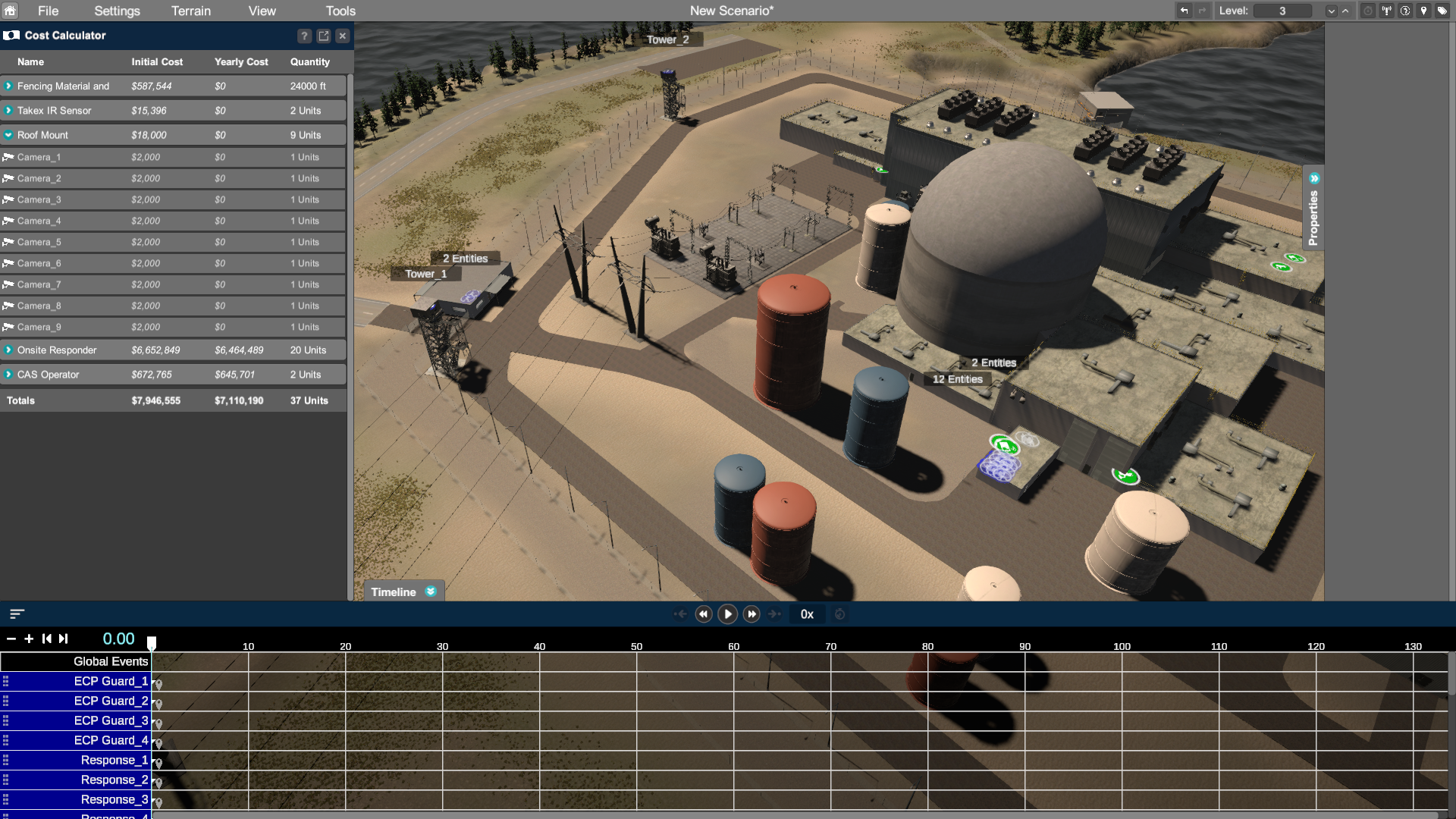
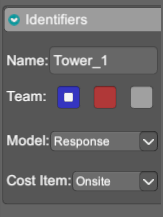
Scribe3D installs two CSV files, Cost_Item_Asset_Reference and Cost_Items, within the ScribeHome folder. These values are referenced by the Cost Item in the Identifiers Section within the Properties Panel of the Entity/Prop. This field is only visible once the Cost Calculator has been opened for the first time or through the View Menu. These CSV files can be updated to reflect the user’s data. For more information, please view the Scribe3D User Manual.
Video Creator & Presenter Mode
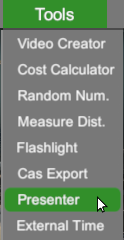
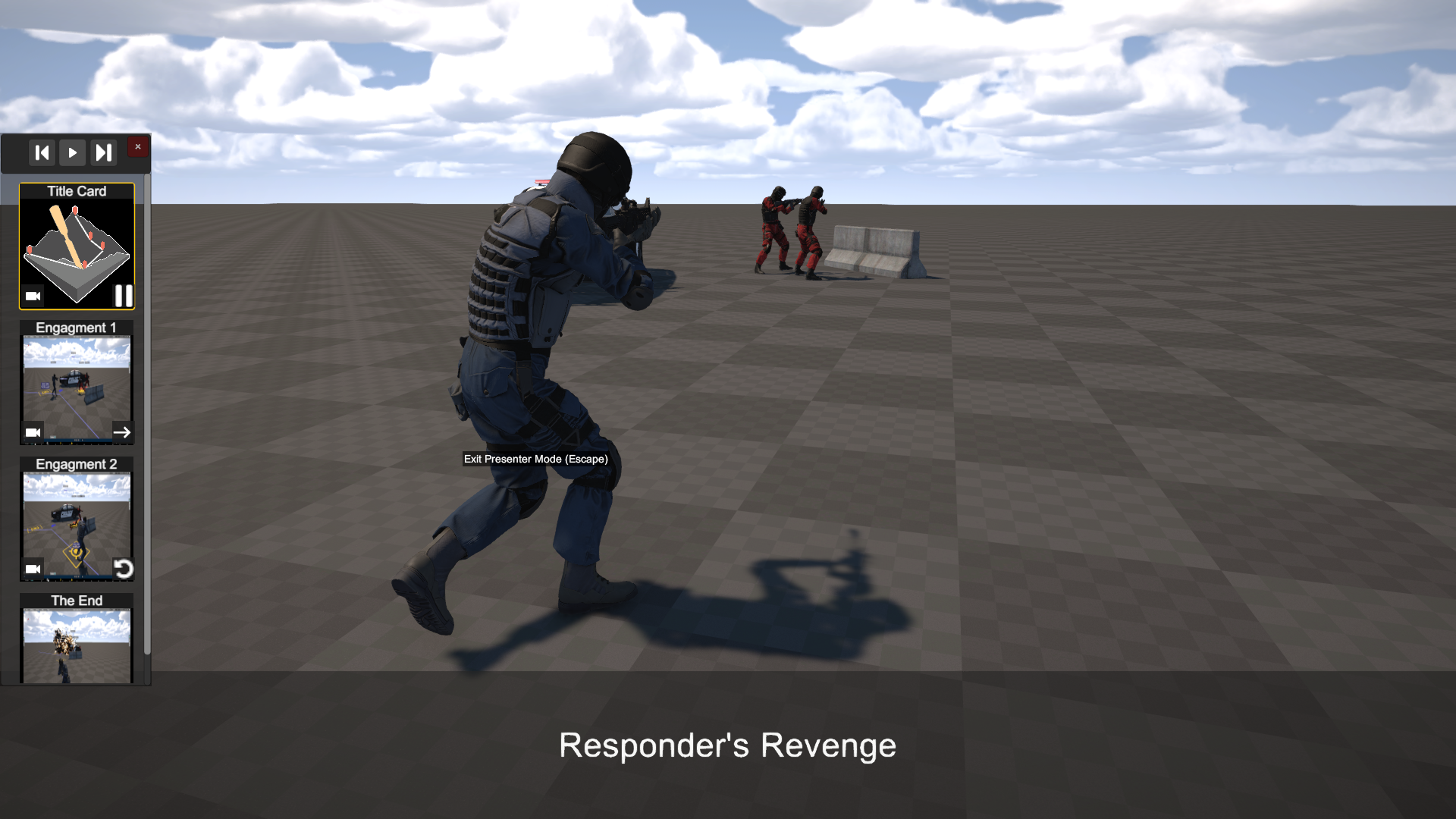
The Video Creator tool has been revamped to improve workflow and include ties to the new Presenter Mode. The Presenter Mode, which can be found using the Tools menu, utilizes the video saved to the Scenario to create seamless presentation experiences directly within Scribe3D.
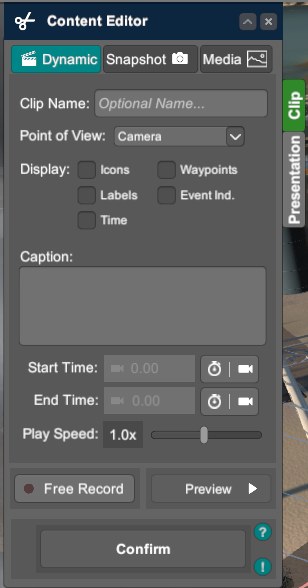
- New Clip type: Media allowing for the import of different photo and video files. Supported File Types include but are not limited to:
- MP4
- JPG
- PNG
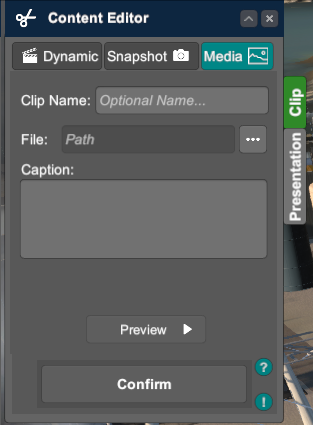
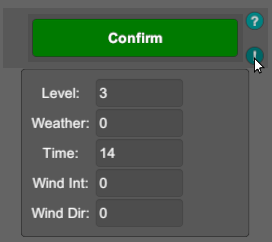
- Levels, Time of Day, and Weather will be captured when a new clip is created. The environment settings and level will need to be set prior to creating a new clip. These settings can be viewed using the Exclamation Point icon next to the Confirm button.
- Presentation tab allows for the import of a thumbnail image for the Presenter mode. PNG is the only accepted file type for the thumbnail. The End Behavior will determine what will happen directly after the clip finishes playing within the Presenter mode.
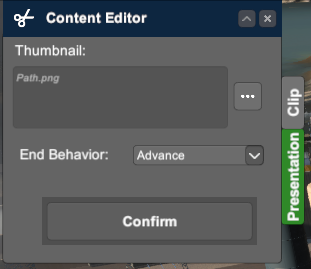
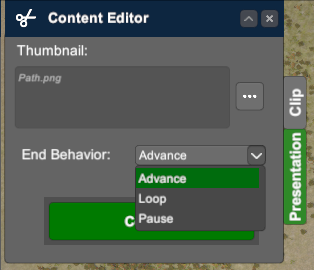
- Advance: Will continue to the next clip.
- Loop: Loop the current clip until specified otherwise.
- Pause: Will stop the clip once it has finished. After the clip has finished playing, users can navigate around the scenario.
- Save Files are now tied to the scenario save file instead of a separate save file.
- Video Exports now export into a Video folder within the scenario’s folder in ScribeHome.
Presenter mode is a new tool within Scribe3D that functions similarly to other presentation tools, like Microsoft PowerPoint. This mode utilizes the work done within the Video Creator to create a presentation. For more information, please see the Scribe3D User Manual.
Video Replay
Attach External Videos to entities to quickly recreate recorded exercise, such as Force-on-Force Exercises. Attaching an external video does not automatically create Waypoints for the parent Entity. External Videos’ playback is synchronized with the Timeline in Scribe3D.
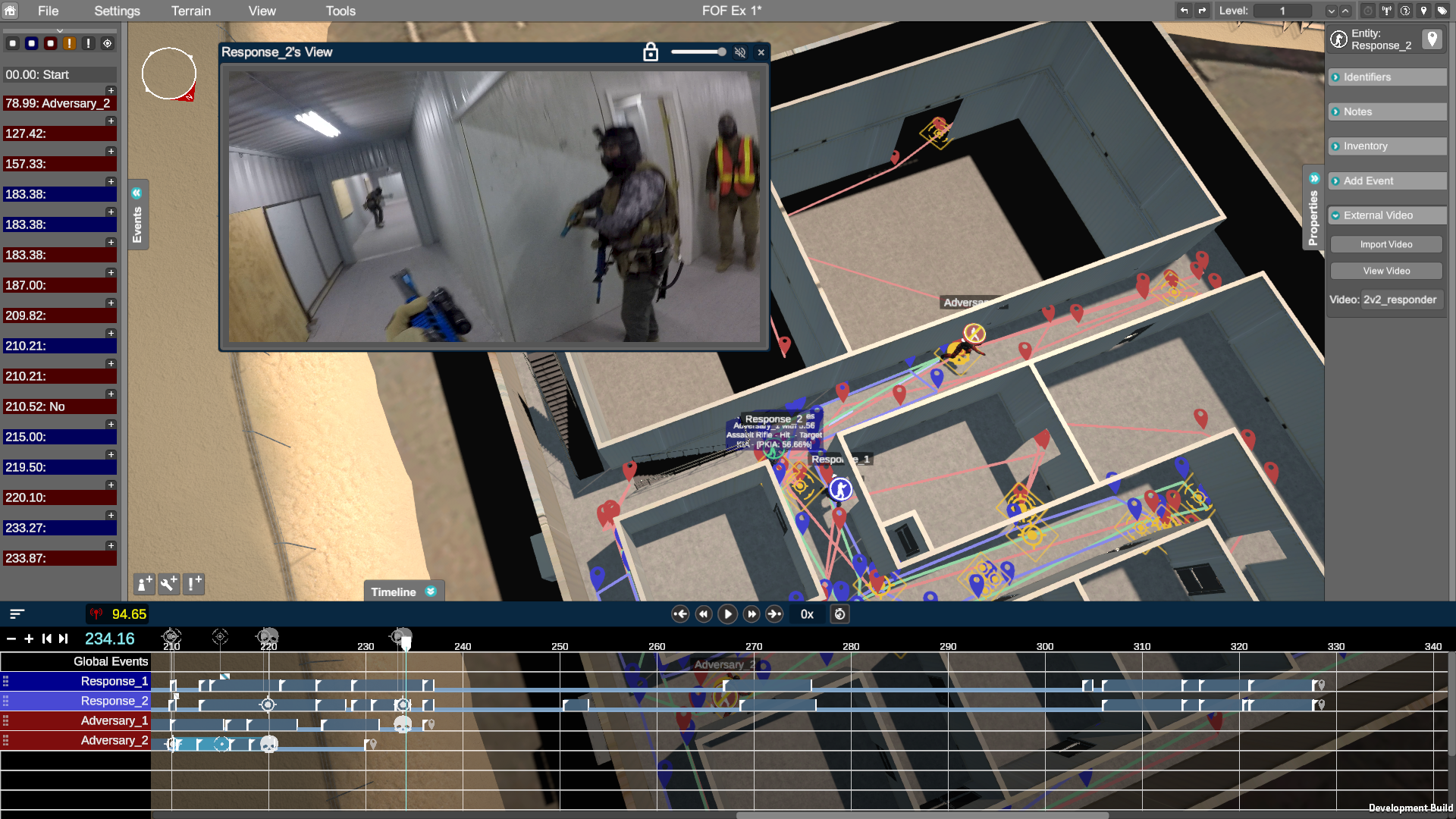
- New External Video Section has been added to Entity’s Properties Panel. The External Video Section is where an External Video can be added to an entity.
- Currently MP4 is the only supported Video File type.
- Video/Waypoint Sync Toggle added to easily replicate the video in Scribe3D. This toggle will automatically adjust the waypoint speed to ensure the entity arrive to new waypoints at the time specified by the Playback Indicator.

- Video Playback Window can be used to view the External Videos attached to an entity.
Plume Visualization
New section added to the Terrain Editor to add different types of Plume Visualizations.
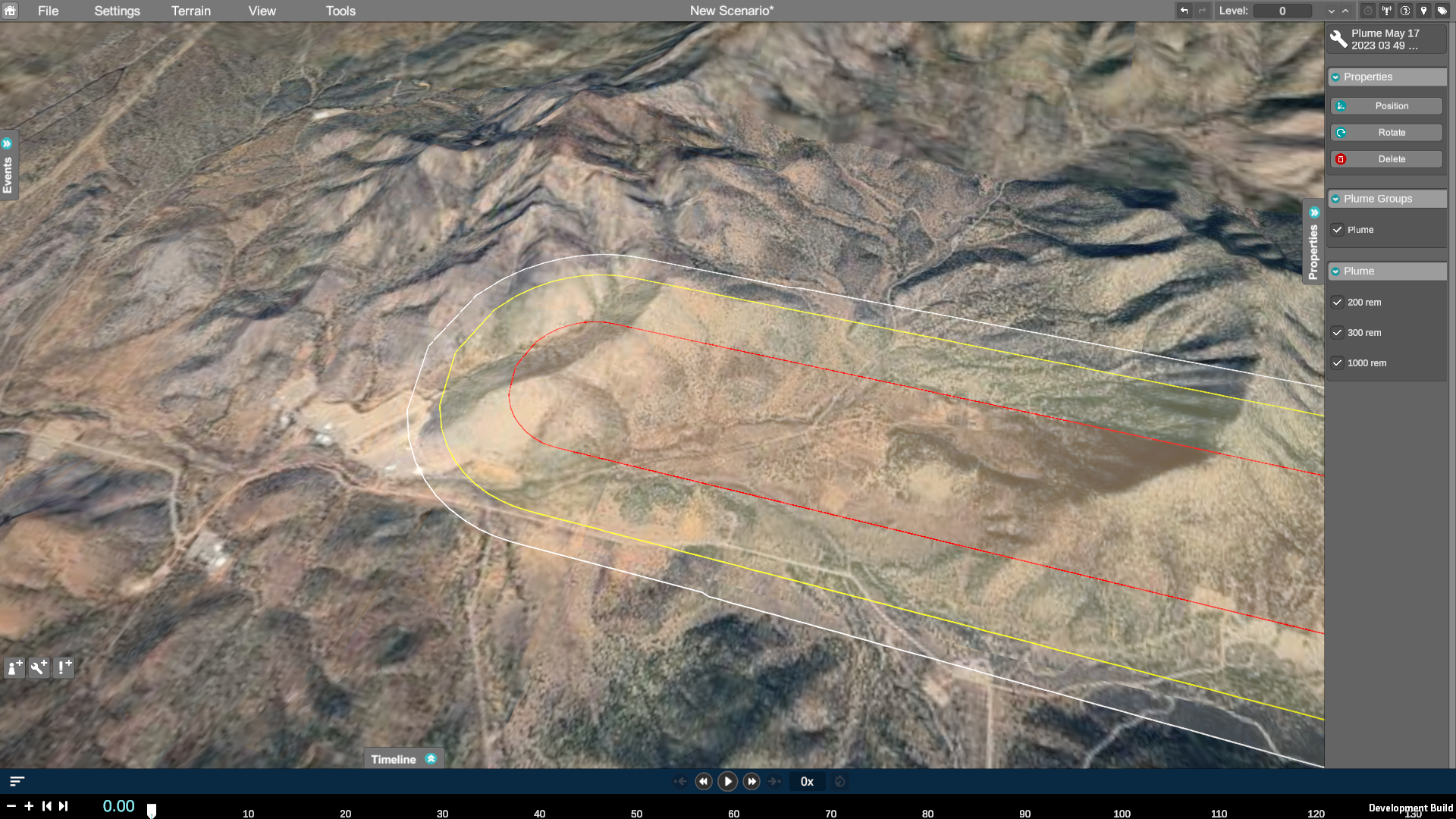
Supported File Types:
- NARAC Plume
- Hotspot Plume
- CM Samples
- Plume data can be added to any Terrain. The data will automatically ask to utilize Live Terrains if the Google API Key has been added (internet connection is required for Live Terrains).
- Visualization Layers can be moved or hidden using the Properties Panel when selected.
Add Entity/Prop/Event User Interface (UI) Buttons
New UI buttons added above the Timeline to add Entities, Props, and Events. This is in addition to right-click controls to access these items through the context menu.

Entity Icon
- Entity Occluded by Terrain – When an entity is underneath a roof, bridge, or other terrain element/prop that would limit the visibility of entity, the entity Icon becomes translucent. Once the entity is visible, the icon will return to its normal state.
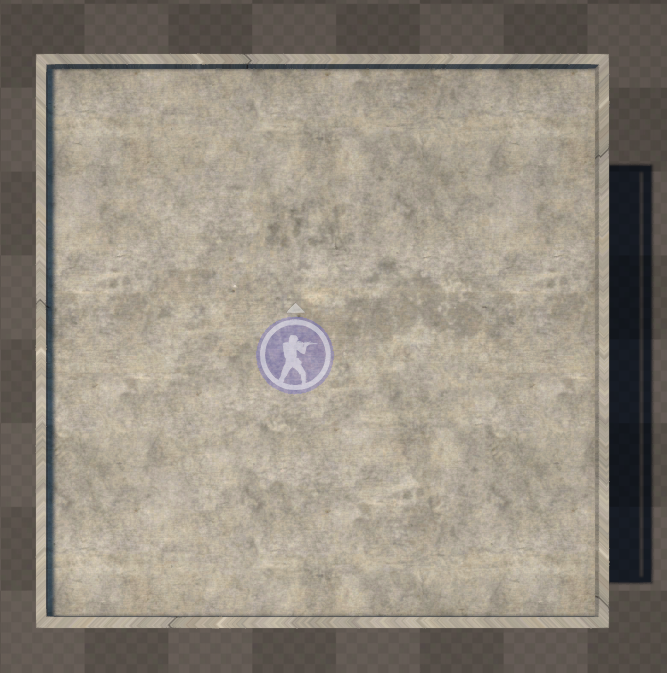
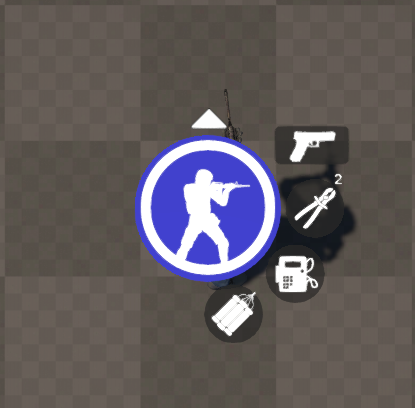
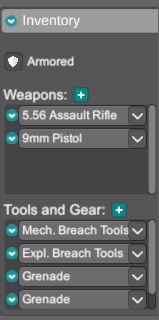
- Indicate Inventory – New inventory icons have been added to the right of the entity icon. The entity icon will show the entity holding their current weapon.
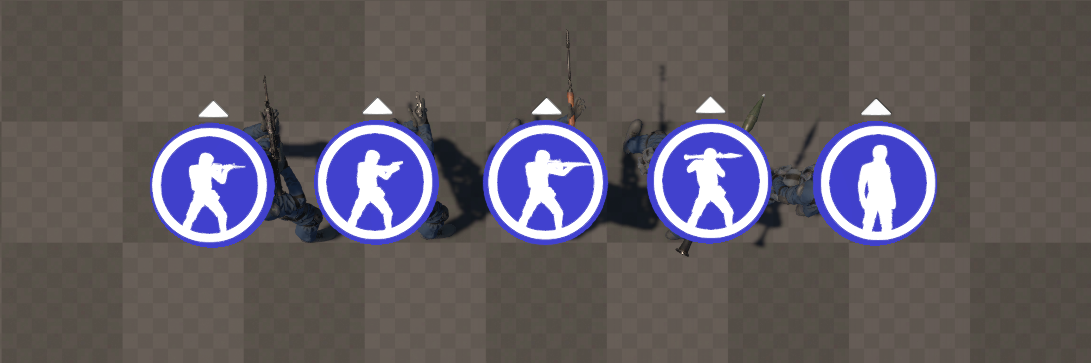
- Alternate Weapon: The first icon to the top right will show the entity’s alternate weapon.
- Tools: The addition icons below the Alternate Weapon show what tools the entity has. This could be mechanical breaching tools, explosives, grenades, and even custom tools.
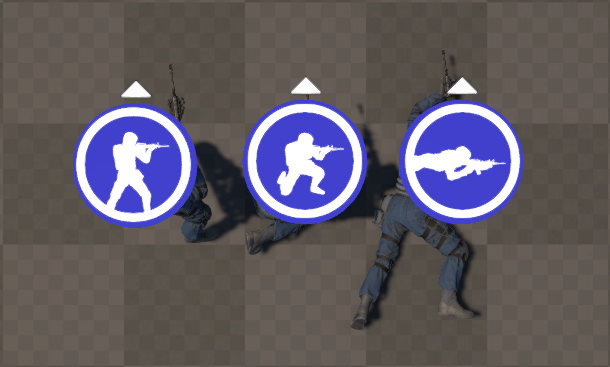
- Indicate Posture – Not only does the entity icon show the currently equipped weapon but also the entity’s current posture at the current time.
New Entity Selection System
Entities now use a visual selection system, similar to Props.
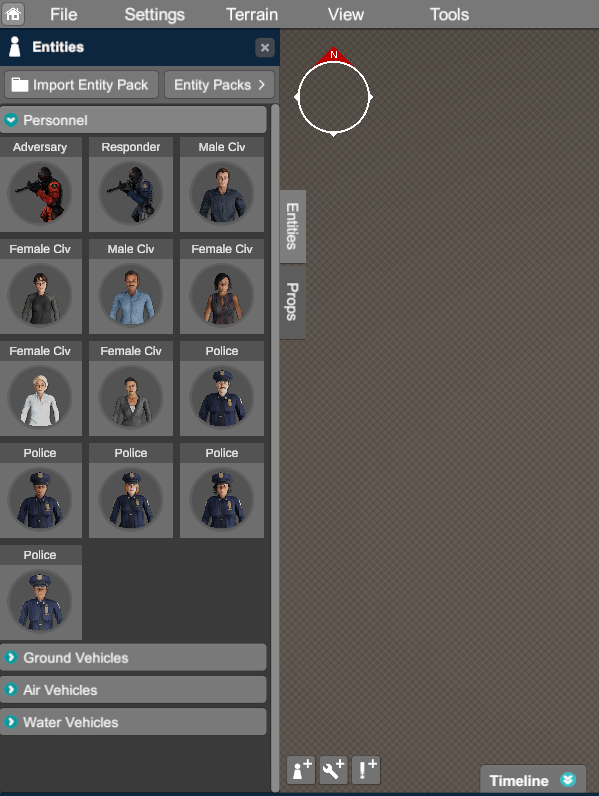
- The new selection menu can be accessed through new UI buttons above the Timeline or through right-clicking the terrain.
- This new panel adds access to Import Entity Packs button for faster importing and the ability to view current entity packs.
- Props Panel and Entities Panel Tabs to switch between the two more quickly.
Properties Panel
- Entity Model Swap – Quickly change the entity’s current 3D model to a different like type entity model.
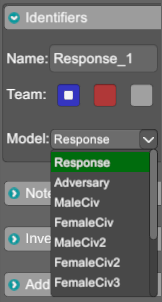
- New Dropdown Menu added to the Identifiers Section in the Properties Panel.
- Models can only be changed to like-type entities. For example:
- Personnel entity models to personnel entity models.
- Ground Vehicle entity models to Ground Vehicle entity models.
- Entity Style Section – New Entity Style Section added to some Entities. Quickly change the color or decals of certain vehicles.
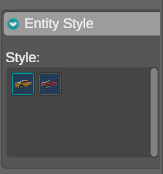
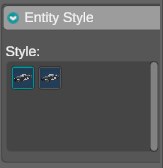
- Currently available for the following entities within the Default Entity Pack:
- Truck
- Police Car
- Police SUV
- Currently available for the following entities within the Default Entity Pack:
- External Video – External Videos can be attached to Entities and some Props. This section was added for the new Video Replay capability.
Compatibility Differences
- Entity packs, prop packs, and terrains updated to Version 4.
- Version 3 packs will not work in Version 4 (See Scribe Upgrade Guide).
- Older Video Creator save files may no longer be compatible.
- Older Facility Builder and/or Building save files may no longer be compatible.
- Older Prop Layout save files may no longer be compatible due to changes made to Prop Packs.
- Some terrain files may have a new default camera position and could potentially prevent older save files from loading correctly.
Bug Fixes
- Improved Environment Settings.
- Improved Facility Builder Texture for Finished Buildings.
- Improved Prop Multi-Selecting.
- Improved Prop scaling.
- Improved shadows on lower graphics settings.
- Improved Vehicle Settings.
- Improved Water Vehicle’s interactions with water.
- Fixed Alternate Buildings not loading into Terrains.
- Fixed Prop Layout/Terrain Modifier not appearing in Video clips in Video Creator.
- Fixed Prop Layout import not updating section in the Terrain Editor.
- Fixed Video Creator Export periodically not finishing.
- Fixed Water Time synchronization with scenarios.
SAND2026-19862N
System Requirements
| Operating System | Windows 10 64-bit |
| Recommended Requirements | |
| CPU | Quad Core @ 3.6GHz or greater |
| GPU | Discrete Graphics Card – NVIDIA GEForce GTX1060, AMD Radeon RX 580 or better with at least 4GB VRAM |
| Memory | 16GB+ RAM |
| Disk Storage | 35GB+ Free |
SAND2025-07211W